Hyphen vs En Dash vs Em Dash: What’s the Difference?
The difference between a hyphen, an en dash and an em dash might seem small, but each has a distinct purpose. Understanding the correct use of these three punctuation marks is an important part of good typography and professional typesetting
The hyphen, en dash and em dash are three different typographic marks. They may look similar, but each has a specific purpose. Using the wrong one can affect meaning, clarity and the overall appearance of a document. Understanding the difference is particularly important in professional design, editorial work and typesetting.
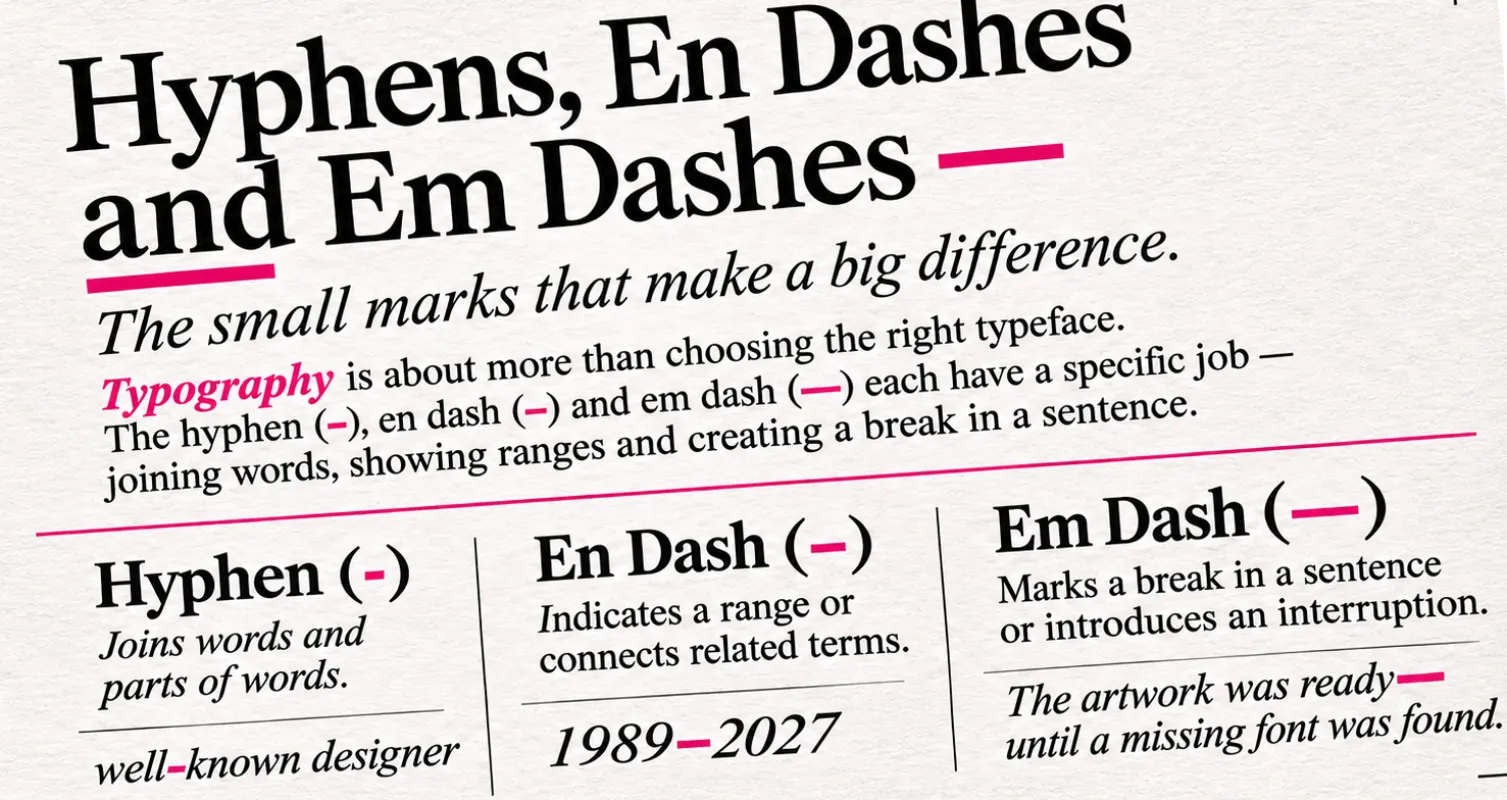
The three marks at a glance
| Mark | Name | Main purpose |
|---|---|---|
| – | Hyphen | Joins words and part words |
| – | En Dash | Indicates a range of connects related items |
| — | Em Dash | MArks a break in a sentence or introduces an interruption |
They are not interchangeable. Each has its own function and spacing conventions.
The hyphen (-)
The hyphen is the shortest of the three marks. It is used to join words, word elements and prefixes to create compound words or clarify meaning. On a standard keyboard, the key usually produces a hyphen-minus character, which serves as the ordinary hyphen in everyday digital text.
When to use a hyphen
Compound adjectives. A hyphen is commonly used when two or more words work together as an adjective before a noun.
- A well-known designer
- A high-quality brochure
- A full-colour photograph
- A long-term project
- A 10-year-old child
The hyphen is not normally needed when the same expression follows the noun:
- The designer is well known.
- The brochure is high quality.
- The phot0graph is full colour
- The project is long term.
- The child is 10 years old.
There are exceptions, so dictionary usage and the publication’s house style should always take precedence.
Preventing confusion
A hyphen can also distinguish between words that otherwise look identical but have different meanings.For example:
- Re-cover: To cover something again.
- Recover: To regain something or return to a normal state
- Re-sign: To sign something again.
- Resign: To leave a job or position.
The hyphen makes the intended meaning clear. Not every combination of two words needs a hyphen. Some compounds are written as separate words, some as one word and others with a hyphen. Established usage and dictionaries determine the preferred form.
The en dash (–)
The en dash is longer than a hyphen but shorter than an em dash. It is particularly useful for indicating a range or a relationship between two things.
When to use an en dash number, date and time ranges
An en dash is used to indicate a span between two values. Examples:
- Pages 12–18
- 2019–2026
- Monday–Friday
- 9am–5pm
- £25,000–£30,000
There should normally be no spaces either side of the en dash when it indicates a range. It is generally preferable to use an en dash rather than a standard keyboard hyphen for professionally typeset ranges.
Connecting related or opposing terms
An en dash can also connect two names, places, subjects or concepts that have a relationship with each other. Examples:
- London–Manchester railway route
- England–Scotland fixture
- Designer–printer relationship
- France–Germany trade agreement
In these examples, the dash indicates a connection between two separate elements rather than joining them into a single compound word. There are no spaces around the en dash in these constructions.
An important point about ranges
Use either a dash or the words that express the range. Do not unnecessarily combine the two.
Correct:
- The exhibition runs from 2019 to 2026.
- The exhibition runs 2019–2026.
Incorrect:
- The exhibition runs from 2019–2026.
The em dash (—)
The em dash is the longest of the three marks. It is used to create a strong break in a sentence, introduce an interruption or set off additional information.
It can perform a similar function to commas, brackets or a colon, but usually gives the interruption more emphasis.
For example:
- ‘The artwork appeared to be ready—until the final pre-flight check revealed a missing font.’
- The em dash creates a noticeable pause and emphasises the change in thought.
How is an em dash different from an en dash?
The em dash is primarily a sentence punctuation mark, whereas the en dash is most commonly used for ranges and connections. However, there is an important difference between UK and US publishing conventions. Many British publishers use a spaced en dash for sentence interruptions:
‘The artwork appeared to be ready – until the final pre-flight check revealed a missing font.’
A common American convention is to use an unspaced em dash:
‘The artwork appeared to be ready—until the final pre-flight check revealed a missing font.’
Both approaches are established editorial conventions. The important thing is to follow the required house style and remain consistent.
Hyphen-vs-En-dash-vs-Em-dash – UK and US punctuation conventions
When it comes to Hyphen-vs-En-dash-vs-Em-dash there is no single rule that applies to every British or American publication. Different publishers and organisations adopt their own house styles. For a UK audience, a good established approach is to use:
Spaced en dashes for sentence interruptions
Example: ‘The brochure – which was originally produced in 2022 – has now been redesigned.’
Unspaced en dashes for ranges
Example: The project ran from 2020–2024.’
A more grammatically complete version would be: ‘The project ran from 2020 to 2024.’
Or simply: ‘The project ran 2020–2024.’
The University of Oxford’s style guide recommends spaced en dashes instead of em dashes for sentence interruptions. UCL Press also specifies spaced en dashes rather than em dashes in its author guidelines. Some American editorial styles favour an unspaced em dash instead. Neither convention is inherently more correct; consistency and the publication’s requirements are what matter. For British professional documents, We recommend adopting the spaced en dash for sentence breaks and the unspaced en dash for ranges.
What is an em space?
An em space is not the same thing as an em dash. An em is a unit of typographic measurement. Its size corresponds to the current type size. For example, in 12-point type, one em measures 12 points.
An em space is a blank space character with a width of one em. It is used in typesetting and text layout to create a specific amount of horizontal spacing. The em dash is a punctuation mark, not a space. The names also provide a useful way of understanding the relative lengths of the marks:
- Em: One em.
- En: Half an em.
- Hyphen: A much shorter connecting mark.
It is worth noting that although the em is traditionally associated with the width of a capital M, in modern typography it is a measurement based on the type size, rather than the actual width of the letter M in a particular font.
How to type hyphens, en dashes and em dashes
You do not need specialist typesetting software to use the correct marks. Both Mac and Windows provide ways to insert them.
Keyboard shortcuts
| Punctuation | Symbol | Mac shortcut | Windows Alt code |
|---|---|---|---|
| Hyphen | – | Standard hyphen key | Standard hyphen key |
| En dash | – | Option + – | Alt + 0150 |
| Em dash | — | Option + Shift + – | Alt + 0151 |
On a Mac
- En dash: Hold down Option and press the hyphen key.
- Em dash: Hold down Option and Shift, then press the hyphen key.
On Windows
- En dash: Hold down Alt and type 0150 on the numeric keypad.
- Em dash: Hold down Alt and type 0151 on the numeric keypad.
Make sure Num Lock is enabled where applicable. The Alt codes require a numeric keypad; the number keys along the top of the keyboard will not work.
Windows without a numeric keypad
Windows 10 and 11 offer another way to insert special characters:
- Press Windows key + . (full stop).
- Select the Symbols section.
- Find the punctuation symbols.
- Select the required dash.
Microsoft Word shortcuts on Windows
Word also has dedicated shortcuts:
- En dash: Ctrl + minus on the numeric keypad.
- Em dash: Ctrl + Alt + minus on the numeric keypad.
These are Word-specific shortcuts, rather than universal Windows shortcuts.
Automatic punctuation in word processors
Some word processors can automatically replace combinations of hyphens with the correct dash. For example, Microsoft Word can convert two consecutive hyphens between words into an em dash. It can also convert a hyphen surrounded by spaces into an en dash. However, these substitutions depend on the application’s AutoCorrect or AutoFormat settings. They should not be relied upon without checking the result.
On many mobile keyboards, holding down the hyphen key also reveals alternative punctuation marks, although the available characters vary between devices and keyboards.
Common mistakes to avoid
A few simple rules will help keep your typography consistent.
| Common mistake | Better approach |
|---|---|
| Using a hyphen for a number range | Use an en dash: 2019–2026 |
| Using an em dash for every sentence break | Follow your chosen house style |
| Adding spaces around a range dash | Write 9am–5pm |
| Using a hyphen where it changes the meaning | Use re-cover and re-sign where required |
| Mixing spaced and unspaced dash styles | Be consistent throughout the document |
| Using a dash instead of a mathematical minus sign | Use the proper minus sign: − |
Remember that the minus sign (−) is a separate mathematical character. It represents subtraction or a negative value, not a word connection or sentence break.
The importance of getting the details right
Good typography is often about the details that readers may not consciously notice, but that make a document easier to read and more professionally presented.
The difference between a hyphen, an en dash and an em dash is not simply a matter of appearance. Each has a distinct purpose, and using the correct one helps preserve meaning, improve readability and maintain typographic consistency.
For designers, printers, editors and anyone preparing artwork for publication, these small distinctions are worth understanding.
Further reading
- University of Oxford – Punctuation and typographic rules
- UCL Press – Guidelines for authors
- Adobe – Typographic terms and definitions
- Microsoft – Em dashes, en dashes and hyphens
- Microsoft – Windows keyboard tips and shortcuts
Explore the world of PrePress